

Stake Casino MoonPay: Secure third-party service for buying crypto
Stake Casino MoonPay is one of the most secure and convenient payment methods you can use to buy crypto. With this option, you won’t need to leave the website and look for an exchange to handle your fiat-to-crypto conversion. Just go to your Stake wallet and choose MoonPay to handle your payment.
Here’s a comprehensive guide to using MoonPay to deposit at Stake casino. It covers how to use their service, what to do when encountering issues, and how customer support can help with your transaction.

How do I deposit Stake using MoonPay?
The MoonPay deposit process can be done in the Stake Wallet page when you’re logged in. Follow the steps below to begin:
Step 1: Click ‘Wallet’ at the top of the screen.

The wallet button is always at the top of the Stake page when you're logged in, whether you're on the homepage or playing a game. Upon clicking the wallet button, you'll be redirected to a window where you can make a deposit or withdraw funds.
Step 2: From the four options provided, click ‘Buy Crypto’.
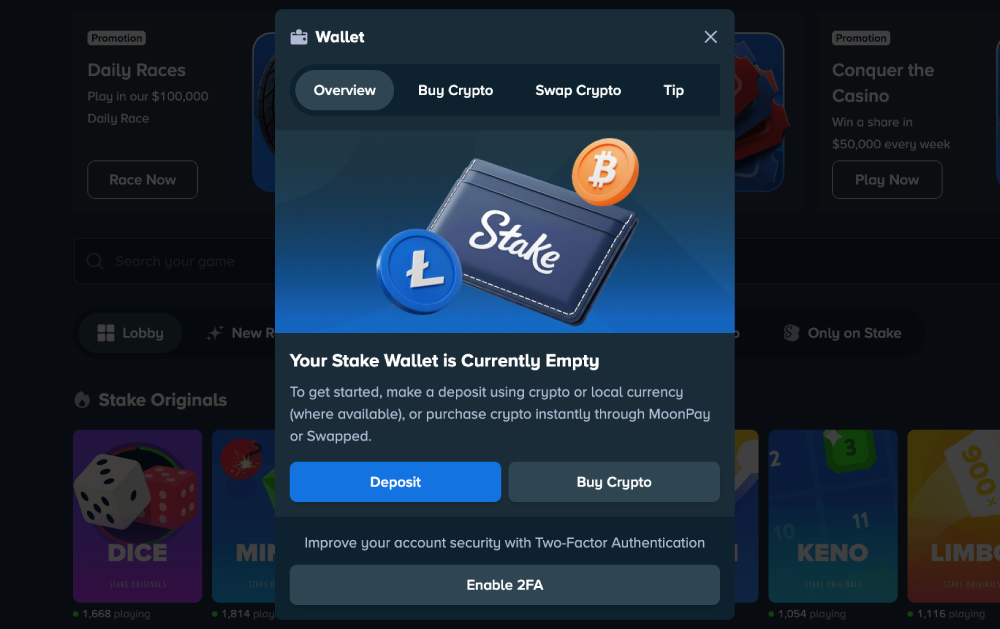
The window opens as a small menu with five tabs, and you would want to click on the ‘Buy Crypto’ option to use MoonPay. It will switch over to the next page, where the essential interface is provided in the intended transaction.
If you want to get funds, your wallet will be in Withdraw Only Mode until you have completed the verification step. Complete at least level 2, which will ask for proof of identity like an ID, driver’s license, or passport. It’s a requirement for Stake Casino’s know-your-customer (KYC) compliance and user protection policy.
Step 3: Select the currencies you wish to buy and use in the purchase.
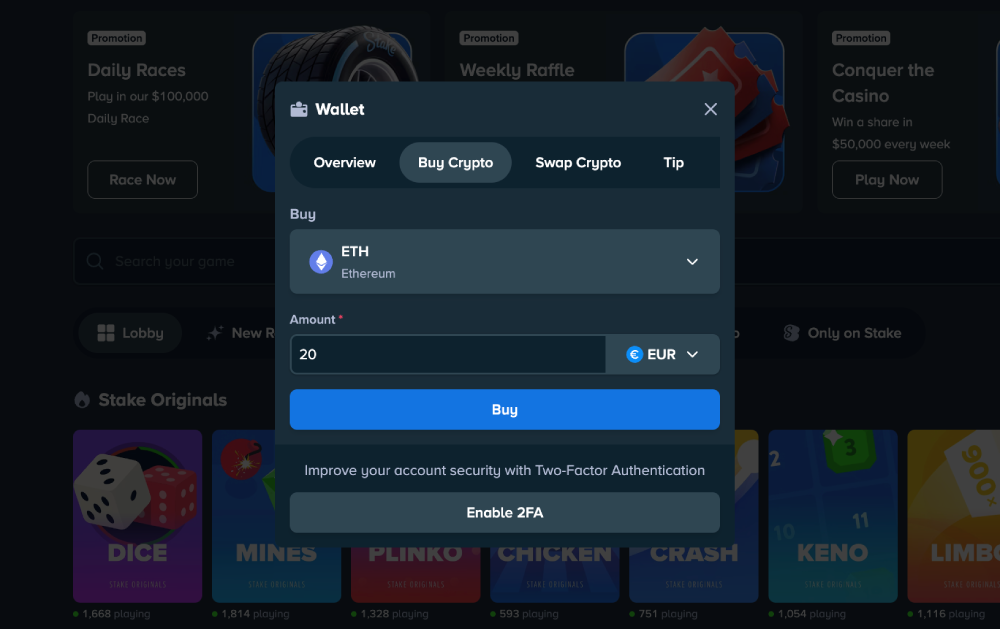
The ‘Buy Crypto’ tab is where you manage your deposit. Choose the cryptocurrency you wish to buy from the drop-down menu at the top and the currency you want to use to pay on the right. The input bar next to the currency under ‘Amount’ is where you type how much in your currency you wish to convert into crypto. Click ‘Buy’ when you’re ready for the next step.
Step 4: Choose MoonPay as the third-party payment provider.
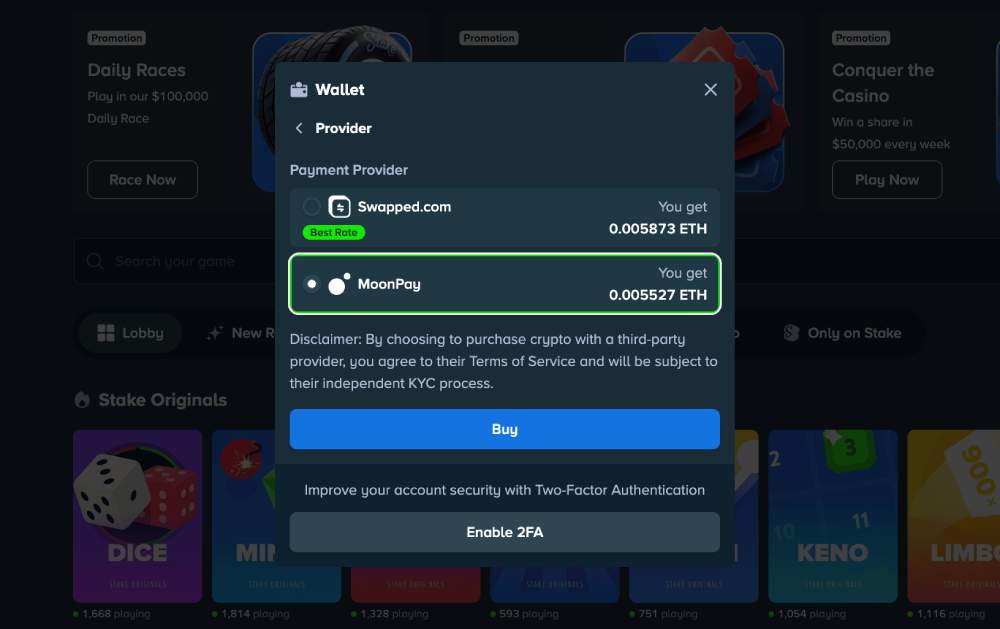
The next menu is where you choose a payment provider. Stake shows the options that are available in your country. MoonPay should be among your options in Germany, and you need at least €20 to use its service. Review the details and click ‘Buy’ to proceed to the next step.
Step 5: Complete the transaction from MoonPay’s website.
The next step will take place on MoonPay’s website, and the process may vary depending on your payment method, chosen crypto, or as per the brand’s latest changes. It will be an easy process with steps to follow. MoonPay accepts bank transfers, wallet apps, credit cards, and prepaid payments.
Step 6: Return to Stake to review your deposit.
Once confirmed, you may return to Stake Casino, where you can review your balance. The deposit may take some time with large amounts, but it should be done within 24 hours.
What should I do if my MoonPay deposit doesn’t show up in my Stake account?
There are two situations where you should take action right away: if the transaction shows as 'confirmed' but your Stake balance hasn’t updated, or if the transaction has been pending for more than 24 hours. Reasons for the delay can be traffic in the blockchain, internet connection issues, or your bank is taking time to review your MoonPay deposit.
Here are some steps you can take when your fund transfer is delayed at Stake:
Monitor your Stake account and document the delay
Take screenshots of key receipts as proof that you haven’t received your funds yet. It can be the pending transaction history, the MoonPay ticket for the purchase of the digital asset, and the status of your Stake wallet.
Important information in these documents should include the following:
Transaction date
Reference number
Recipient payment details
Total amount of deposit
The date and time when you finalised the Buy Crypto process at Stake.
It is the line of letters and numbers to identify the transaction and help the providers track it.
This should include your selected payment method, the crypto you bought, and the currency used to pay for it.
It’s the amount you expect to receive in your Stake wallet if the deposit is complete.
Contact the Stake support team with the documents ready
You can contact the Stake support team via live chat or email. If you wish to reach out for initial follow-ups and inquiries, you can do it quickly via Live Support. It’s at the bottom right of the Stake Casino page, accessible across the website. Alternatively, can send an email for a more detailed report to support@stake.com.
The Live Support is great for when you just want a quick response from Stake’s team. Click on the small icon at the bottom right of the screen or the ‘Live Support’ link on the left-side menu to open the chat box. An agent will be in touch with you shortly after you send your first message. State your concerns right away and clearly to find a quick solution.
A more detailed report should be covered via email. You may attach screenshots of relevant documents, or you can type in all the important information in a readable format. Either way is helpful to the agent in finding a solution or reassuring you that the online casino MoonPay transaction will be complete.
Contact your bank or credit card provider for a follow-up
If the issue with the delay is not in the website, then the problem can be with the third-party. The agent representing Stake casino can at least reassure you of this fact and lead you towards possible points of error. That can be MoonPay, your bank provider, or the blockchain transferring the crypto to your account wallet.
MoonPay has a dedicated bank contact-us page that you can visit. It lists all the ways you can use to reach out and inquire about your delayed transaction. Your bank provider has online platforms you can visit and request a support ticket, or visit a local branch. Card providers have accessible online help centres that list their contact information.
How long does it take to process a MoonPay transfer in Stake Casino?
The MoonPay casino deposit 24-hour grace period starts from the moment it receives your payment, not when you placed your order. If it has not yet received your payment within the expected processing time, then the delay is happening from the provider of your payment method.
Here’s how long it usually takes for MoonPay to receive your payment based on the method:
Payment method | Processing time |
Credit/debit card | Instantly or within 24 hours. |
UK bank transfer | Within 24 hours. |
Single Euro Payments Area (SEPA bank transfer) | Within 72 hours. |
Automated Clearing House (ACH bank transfer) | Within 96 to 120 hours. |
PayPal | Instantly or within 24 hours. |
Venmo | Instantly or within 24 hours. |
Cards and e-wallets offer quick services, making them great options for a seamless MoonPay casino deposit. Bank transfers, on the other hand, are slower because they tend to go through strict know-your-customer verification. Hence, it’s more secure and ideal for cautious bettors.
Are there deposit limits or fees when using MoonPay on Stake?
There are no minimum or maximum limits for Stake deposits, but MoonPay has them. See the details below to set your expectations of their service:
Stake MoonPay minimum limit
Stake MoonPay has a minimum limit that varies with the currency you wish to use for payment. In general, it is set to €20.00, and MoonPay won’t be available as an option unless you input an amount equal to or more than that. It will be greyed out with a note stating ‘Sorry, minimum purchase amount is 20.00 EUR’.

Stake MoonPay's maximum limit
There is also a maximum limit to Stake MoonPay, and it is up to €30,000.00. That means you cannot use this option if the amount you typed in is more than the set limits. It will list MoonPay’s option as greyed out with a note stating ‘Sorry, maximum purchase amount is 30000.00 EUR’.

Stake deposit fees
MoonPay is a service provider, and they charge a fee that depends on factors like the processing costs, chargeback, and other factors related to the transaction. The standard fee is 4.5%, with an increase of between 0.25% and 10% depending on your chosen currencies. You can review these details on MoonPay’s overview before you finalise.
Where can I find my MoonPay transaction hash or reference ID?
MoonPay hash or reference ID can be found in the official receipt of your transaction. It is in the ticket along with the indicator of its status, as well as other information like how much you paid or received.
Here are two ways to find your transaction hash:
Stake transaction history dashboard
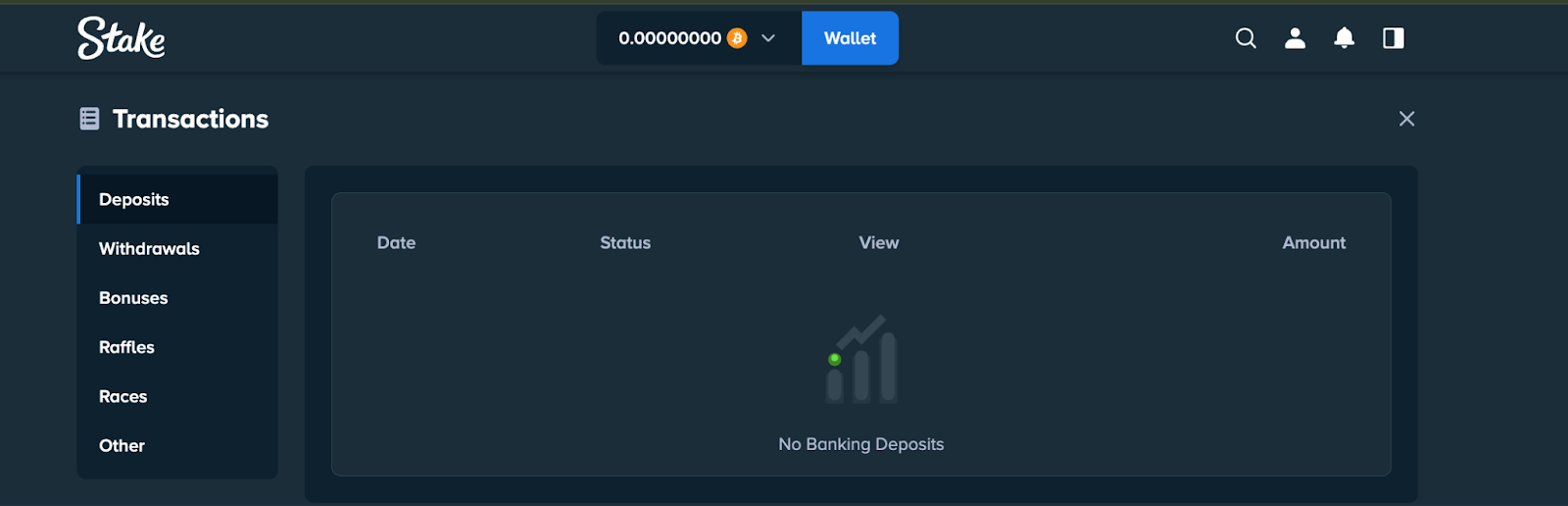
Your Stake account keeps track of all your activities, like deposits, withdrawals, and promotions you opted into. It will list them in categories as receipts or tickets that include all the important information, including their status. This is where you can take a quick look to see if it’s still pending or completed.
To get here, just follow these steps:
- Click the person icon on the top right corner of the Stake page.
- Select ‘Transactions’ from the menu that appears under it.
- Go to the Deposit tab, usually found on the right side of the Transactions page.
This lists all transactions, including pending, confirmed, and cancelled ones. It also lists other deposits, like direct peer-to-peer (P2P) or those made with Swapped.com. The transaction records show which payment method is used to help you find which ones are made with MoonPay.
E-mail confirmation from MoonPay
MoonPay sends an e-mail confirmation to your address after a transaction. This is your proof of purchase, and a useful document to present to Stake support if the funds are delayed. Like the dashboard, it shows all important information, including the hash, amounts paid and received, as well as the time and date of the transaction.
Follow these steps to find your e-mail confirmation:
- Open your e-mail inbox, the one you provided to MoonPay as a valid contact detail.
- Filter options using the search engine to send to MoonPay or Stake.
- Open the latest e-mail received from MoonPay or Stake.
If you cannot find it in your main inbox, check the spam or important folder. This happens because of Google’s ever-changing filter system, which affects many businesses.
What should I do if I encounter MoonPay issues on Stake Casino?
MoonPay customer service can offer solutions for any problem, and the first step is to identify what’s wrong. They’ve made a list of the most common issues their users experience to help with troubleshooting.
Here they are, and what you should do when you encounter them:
Sent funds to the wrong address
Immediately reach out to MoonPay using the live chat feature found on the lower right of their website. Provide the transaction hash of the deposit and a refund wallet address, where the money will be sent as a correction.
The refund wallet address must be one that was used with MoonPay before. If you’ve used the MoonPay payment method for Stake before, then you can have them send your funds there directly. Otherwise, use the address of the wallet you used to pay for the transaction.
Failed transaction with no refund
MoonPay immediately cancels the pre-authorisation on payments, which should return your funds to your bank or e-wallet account. It should also come with a notification from your service provider stating that the payment was cancelled. Your account balance should reflect this refund within 10 days.
If the failed transaction is still charged, then you may reach out to MoonPay or your payment provider. Provide documents showing the transfer status and the bank info of the sender and recipient.
Charged more than once for one order
It is possible to receive the same e-mail confirmation twice for the same order when there’s a system error or internet connection issues. This does not mean that you are charged twice, just that the same message was duplicated. To make sure that this is the case, check your Stake transaction dashboard. If there is only one ticket, then it was charged once.
Checking your bank account and Stake wallet balance is also helpful. However, you need to have a document of how much they had before the transaction. These can help you prove that you’ve been charged twice. If you did, show MoonPay or your payment provider the duplicated notification, their transaction hash, and the amount sent.
Funds from a completed transaction are not in your crypto wallet
Transfers of crypto like Bitcoin (BTC) and Ethereum (ETH) are potentially instant, but not always. Sometimes, they take 10 minutes or days to transfer assets from one wallet to another, with delays caused by high traffic in the blockchain.
While waiting, you can double-check the transaction confirmation to see if the entered address is with your intended receiving wallet. Contact MoonPay or your payment provider if it’s correct, but have yet to receive the funds. If it’s incorrect, then it’s a case of sending the funds to the wrong address.

Frequently Asked Questions (FAQs)
Here are some of the frequently asked questions about the Stake casino MoonPay payment: